

Overview
The Windows Performance Toolkit (WPT) is a suite of tools designed for measuring and analysing system and application performance on Windows XP, Windows Vista, Windows 7 and Windows Server 2008. They can be used by enterprises to log and analyse clients in order to detect and optimise performance problems. I intend to use the WPT in a number of upcoming articles so this post will cover how to obtain and install it.
Unfortunately, the WPT is included as part of the Windows 7 SDK and cannot be downloaded separately, and the SDK download is a whopping 2.5GB! However, by following these steps it is possible to download only the minimal files required to gain access to the WPT MSI files. These MSI files can then be internally redistributed for easy installation of WPT.
Installation
- Download the Microsoft Windows SDK for Windows 7 and .NET Framework 4 (it’s a bootstrap setup and is only around 500KB).
- Run the file winsdk_web.exe.
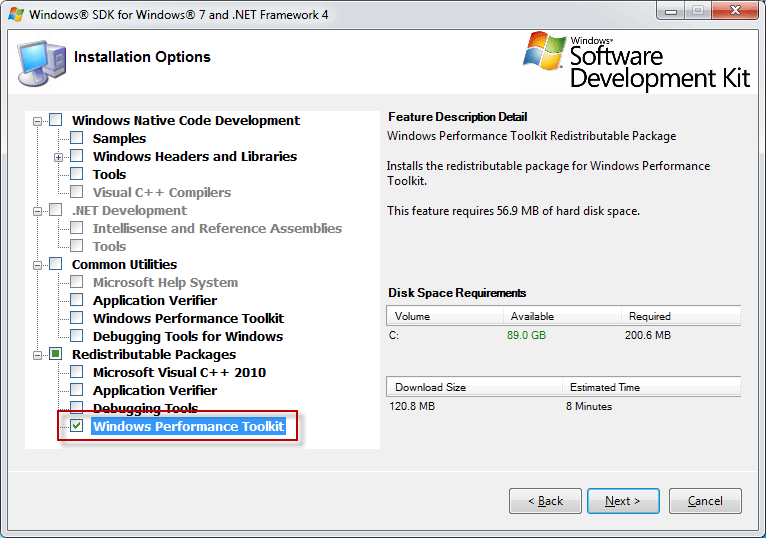
- Accept all defaults until the Installation Options screen is reached.
- Deselect all components except Redistributable Packages \ Windows Performance Toolkit. (Depending on the client, you may not have the option to deselect the .NET 4 tools)
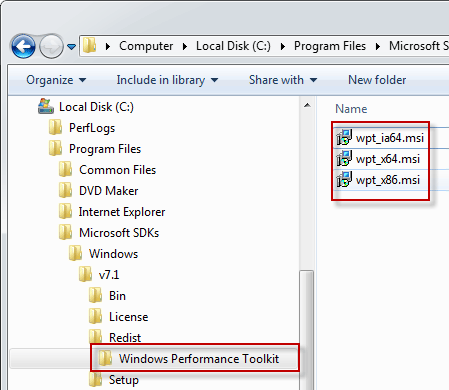
These wpt_*.msi files can now be used to install the WPT on any client machine and should be kept in a safe place so that you don’t need to download the SDK each time.